Claude Safari extension for Mac
Claude AI for Safari.
The page is open. Ask Claude about it.
AlliHat puts Claude AI in a Safari sidebar on your Mac. Read a long article together, explain a confusing passage, or ask Claude to handle a browser task. Stay on the page you're using.

7-day trial, then $29.99/year. macOS 14+.
Requires an Anthropic API key. API usage costs extra.
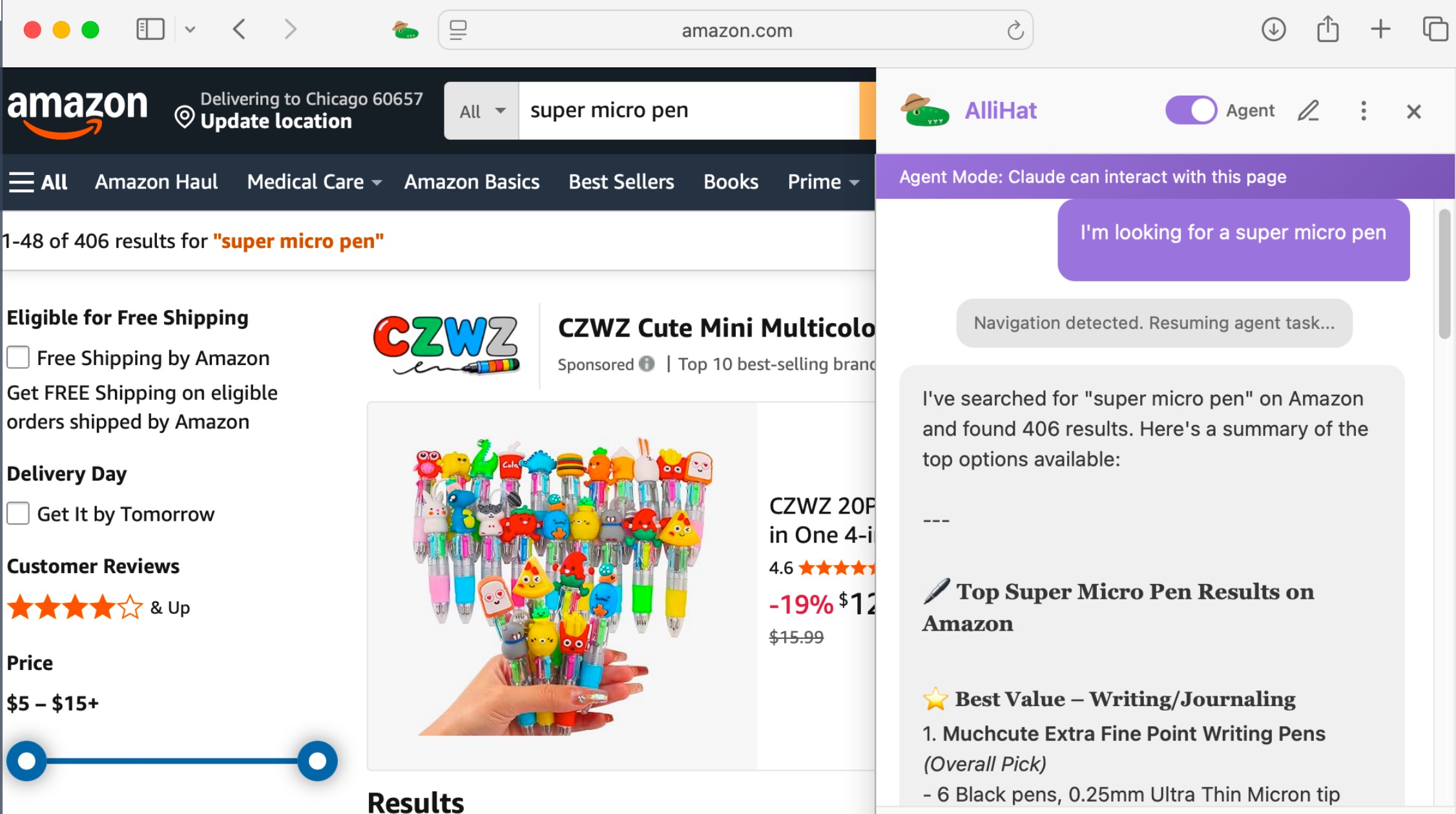
Claude can work with the page you're on.
Opening claude.ai in Safari gives you a place to chat. AlliHat adds a sidebar that can use the current webpage as context, so you can ask about what you're reading without pasting it into a separate conversation.
Get past the first summary.
Ask for the main points of an article, then follow up about a particular claim. On documentation, ask how an example works. On a product page, ask which details matter for what you need.
Example prompts to try
"Summarize this page, then point out anything the author hasn't explained."
"Explain the selected paragraph in plain language."
For a smaller question, highlight text and use AlliHat's selection menu. Claude gets the passage you picked. You can also ask about a PDF in Safari or summarize a YouTube video with an available transcript.
Let Claude handle the clicks.
Turn on Agent Mode and describe what you want done. Claude can click buttons, fill fields, scroll, and navigate. Watch it work in Safari and stop it from the sidebar when you need to.
How to add Claude to Safari.
- Install and enable AlliHat. Download it from the Mac App Store. Open Safari's Settings, choose Extensions, and enable AlliHat. Allow access to the websites you want to use it on.
- Create an Anthropic API key. Sign in to the Claude Console, set up API billing, and create a key. Our Claude API key guide walks through this part.
- Choose Claude in AlliHat. Open the Safari sidebar and its model picker. Choose Claude, paste your API key when prompted, and save it.
- Ask about a page. Open an article and try "What are the main points?" If you have just enabled the extension, reload the page first.
Need a hand with the extension or your key? See AlliHat setup help.
Two separate costs. No Claude subscription required.
AlliHat costs $29.99 per year after a 7-day trial. That pays for the Safari extension. Cancel the subscription anytime.
Anthropic bills separately for Claude API usage. The amount depends on how much you send and how much Claude writes back. Long pages and multi-step Agent Mode tasks can use more than short questions. Check your API usage and billing in the Claude Console.
A Claude Pro or Max subscription does not cover the API requests AlliHat makes. You don't need either subscription to use Claude here. Anthropic explains how Claude subscriptions and API billing differ.
Prefer to connect an account without setting up an API key? AlliHat also supports ChatGPT account sign-in in Safari. Your ChatGPT plan limits apply; the AlliHat subscription remains separate.
Your Claude key stays on your Mac.
AlliHat stores it in Safari's local extension storage. When you ask Claude a question, your request and the page context needed to answer it go directly to Anthropic. Agent Mode can also send page screenshots. They don't pass through an AlliHat server.
This is a connection to Claude's API, not a copy of your claude.ai account. It does not import your existing Claude conversations. Read our privacy policy for more detail.
Common questions about Claude in Safari.
Can I use Claude AI in Safari?
Yes. AlliHat adds a Claude sidebar to Safari on Mac. Enable the extension, choose Claude, and connect an Anthropic API key. You can ask about the current page without copying it into another tab.
Is AlliHat an official Anthropic extension?
No. AlliHat is independent software made by Nate Kontny. When you choose Claude, it connects directly to Anthropic using your API key.
Can I use my Claude Pro or Max subscription?
AlliHat connects to Claude with an Anthropic API key. It does not sign in to your Claude Pro or Max account. API usage is billed separately from those subscriptions and from your AlliHat subscription.
Can Claude click and fill forms in Safari?
Yes. Turn on Agent Mode in AlliHat and describe the task. Claude can click buttons, fill fields, scroll, and navigate while you watch. You can stop it from the sidebar.
Does this work on iPhone or iPad?
No. AlliHat is a Safari extension for Mac and requires macOS 14 or later.
Can I use ChatGPT instead?
Yes. Choose ChatGPT sign-in in AlliHat and connect your ChatGPT account without an API key. Your ChatGPT plan limits apply, and your AlliHat subscription is separate.
Keep going.
Get a Claude API key Use ChatGPT in Safari with your account Compare AI extensions for SafariBring Claude to the page.
7-day trial, then $29.99/year. Anthropic API usage billed separately.