ChatGPT Safari extension for Mac
ChatGPT in Safari. No API key needed.
Sign in with your ChatGPT account. AlliHat puts it beside the page in Safari, ready to answer questions, explain selected text, or help with browser tasks. No API key needed.

$29.99/year after trial · macOS 14+ · Sign in with ChatGPT. No API key needed.
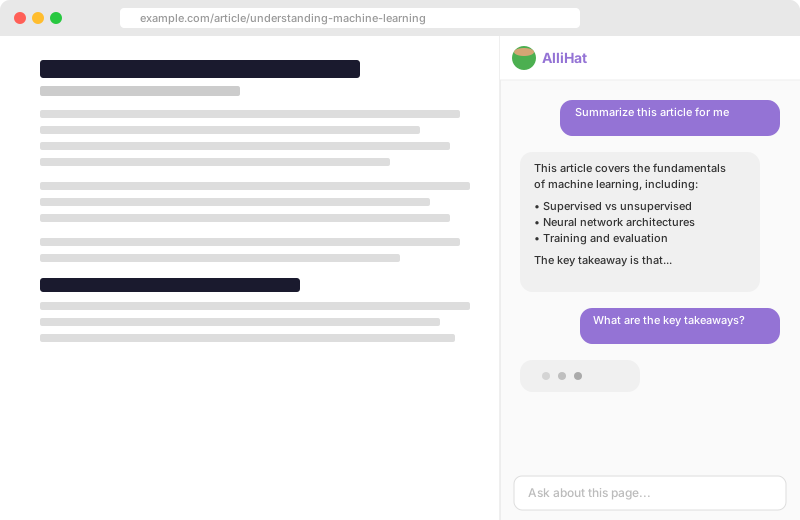
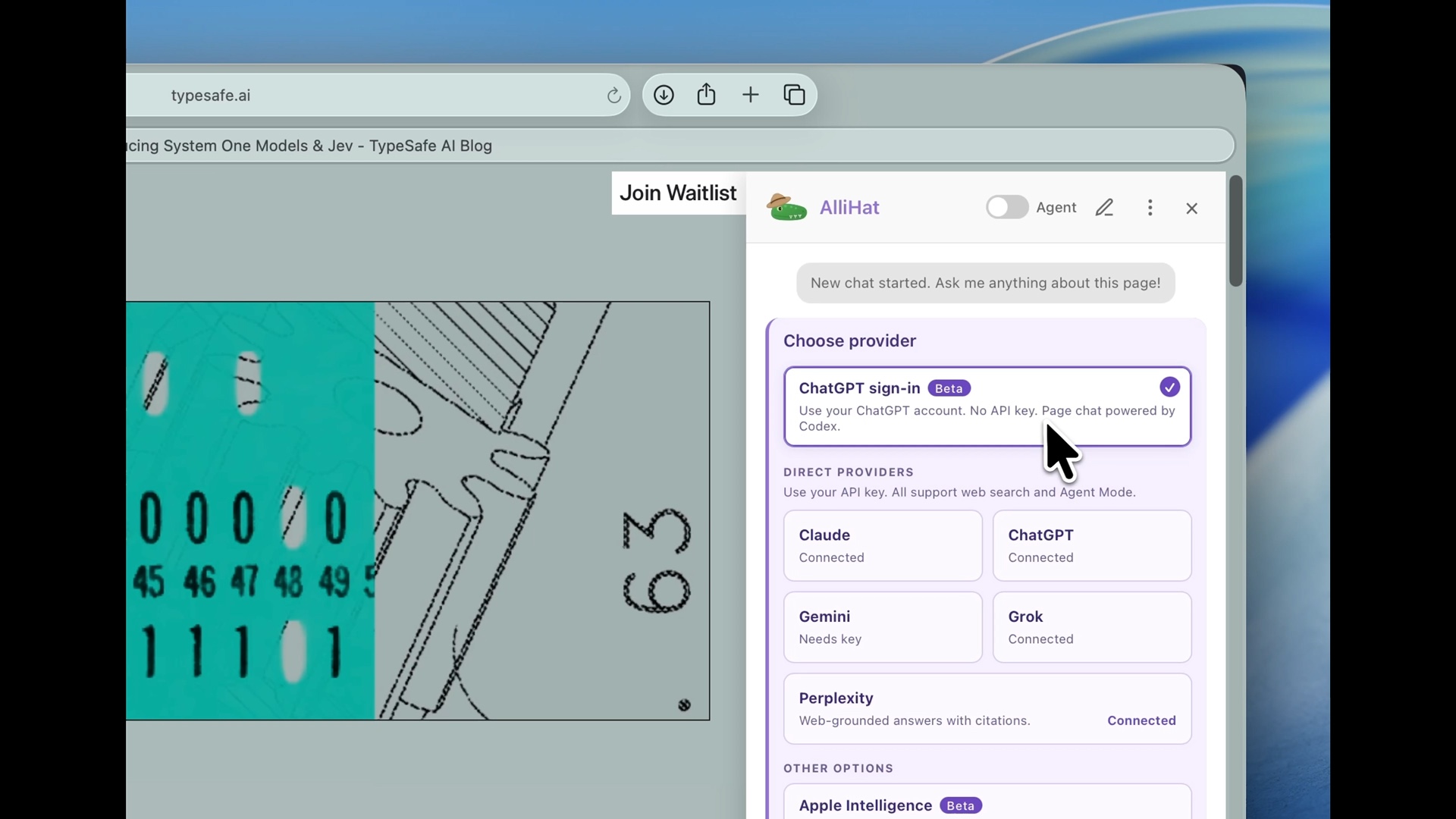
Use the ChatGPT account you already have.
Open AlliHat's model picker and choose ChatGPT sign-in. Complete the sign-in in your browser, then return to the Safari page you wanted help with. You don't need to create an API key or set up API billing for this option.
Try a question about the page.
Start with "Summarize this page in five bullet points." Then ask a follow-up such as "Which part supports the author's conclusion?" For a video, follow our guide to summarizing YouTube videos in Safari.
Account sign-in and API access are separate choices.
ChatGPT sign-in uses your account's access and usage limits. The API-key option uses separate OpenAI API billing. Your AlliHat subscription is separate from either option. If you reach an account limit, check the message from ChatGPT before trying again.
Your existing ChatGPT conversations stay there.
AlliHat doesn't import your ChatGPT chat history or memories. Start a conversation in the Safari sidebar about the page you're on. The sign-in connects your account; it doesn't copy your old chats into AlliHat.
OpenAI on iPhone and iPad
Changes where searches go.
OpenAI's Safari Search extension can send searches from Safari's address bar to ChatGPT. It is useful when you want ChatGPT to replace a traditional search engine.
AlliHat on Mac
Works beside the page.
AlliHat stays open next to what you are viewing. ChatGPT gets the page or selected text as context and can take browser actions when you ask.
AlliHat is independent software and is not affiliated with OpenAI. Read about OpenAI's Safari Search extension.
No more Safari-to-ChatGPT copypasta.
The page is already there. Ask the question.
Read
Ask about this page
Summarize an article, question a claim, pull details from documentation, or ask what you missed without opening another tab.
Explain
Use selected text
Highlight code, legalese, a dense paragraph, or anything else. Send just that selection to ChatGPT with the surrounding page available when needed.
Act
Let it handle the clicks
Agent Mode can click buttons, fill fields, scroll, and navigate. You stay in Safari and watch what it does.
Setup
Three steps. About two minutes.
-
1
Install AlliHat. Get it from the Mac App Store, then enable the extension in Safari settings.
-
2
Sign in with ChatGPT. Open the model picker in the AlliHat sidebar, choose ChatGPT sign-in, and sign in with your ChatGPT account.
-
3
Ask about the page. Return to Safari and ask a question, highlight something to explain, or turn on Agent Mode for help with browser tasks.
Your account stays yours
No AlliHat account. No AlliHat server.
Your ChatGPT sign-in is stored on your Mac. Questions and page content go to OpenAI, not through an AlliHat server. AlliHat cannot see your existing ChatGPT chats or memories.
Common questions
Does ChatGPT have a Safari extension?
OpenAI includes a Safari Search extension with its iPhone and iPad app that can route address-bar searches to ChatGPT. AlliHat does a different job on Mac: it puts ChatGPT beside the current page, gives it page context, and lets it act on websites when you ask.
Can ChatGPT read the current Safari page?
With AlliHat enabled, yes. Open the sidebar and ask about the current page, or highlight text and send that selection. AlliHat only provides page context when you use it.
Is there a ChatGPT sidebar for Safari?
AlliHat is a ChatGPT sidebar for Safari on Mac. It stays next to the webpage instead of sending you to a separate ChatGPT tab.
Do I need an OpenAI API key?
No. Choose ChatGPT sign-in and use your ChatGPT account. Your ChatGPT plan limits apply, and your AlliHat subscription is separate. API-key access is still available if you prefer it, with separate OpenAI API billing.
Does AlliHat work on iPhone or iPad?
No. AlliHat is a Mac app for Safari. It requires macOS 14 or later.
Can AlliHat see my existing ChatGPT chats?
No. Signing in does not give AlliHat access to your existing ChatGPT chats or memories. It sends the questions you ask in AlliHat and the page context needed to answer them to OpenAI.
ChatGPT beside every Safari page.
$29.99 a year after a 7-day trial · Sign in with ChatGPT. No API key needed.